Travel credit cards are corporate liability cards, rather than personal liability, which the university pays US Bank for all charged transactions. Transactions charged to your Travel Card will be visible on your homepage in Concur. These transactions need to be reconciled as soon as possible after your trip occurs.
Travel cards are intended for individual travel expenses which may include lodging, vehicle rental car and gas, food within the per diem rate for your destination, and ground transportation. Cash withdrawals are not allowed on Travel Cards. Non-allowable expenses and/or those in excess of travel allowance will be marked as personal expenses which the traveler may need to reimburse the university for after the trip is complete. Learn more from PSC's Travel Card Handbook here.
Follow the steps below to apply for a travel card:
-
Complete the required trainings by following the steps listed below:
- Log into MyCUInfo portal using your identikey and password
- Click the "SkillSoft / Percipio" tile
- Using the "Search Content" field, find and complete the trainings "Fiscal Code of Ethics" (F00001) and "Travel and Travel Card" (U00078)
-
Email CIRES Travel (cirestravel@colorado.edu) once the trainings have been completed to request a travel card application be submitted on your behalf. In this email, please include:
- If you would like the travel card mailed to the CIRES Message Center (where you can pick up the card) or your personal residence. If to your personal residence, please include your personal mailing address in the email.
- If you choose to have card sent to CIRES Message Center, it may add an extra week before the card is received due to campus mail processing.
- The phone number that should be associated with your card.
- Your Completion Certificates for the 2 required trainings from SkillSoft/Percipio.
- If you are a GRA, please also let the CIRES Travel Team know if you have an upcoming trip and what CIRES speedtype will be supporting your trip costs. If your trip costs are not going to be supported by CIRES, it may be more appropriate that your Travel Card request route through your academic department.
- Typically travel card applications are processed by the Procurement Service Center (PSC) within 2 weeks. The card will be sent to the address submitted as part of the request. If your card is being sent to the CIRES Message Center, you will be contacted when it is ready for you to pick-up. Please note that if you choose to have the card mailed to the CIRES Message Center, this could add an extra week before the card is delivered because of processing through the University mail system.
Travel Card FAQs
- Can travel cards be used for both domestic and international travel expenses? Yes, you may use your travel card while conducting business travel domestically and internationally.
- Where can I find my travel card expenses? Transactions charged to your Travel Card will be visible on your homepage in Concur.
- Does my travel card automatically renew when close to the expiration date? Yes, when your travel card nears expiration a new travel card will be mailed to the work address on file. Your current travel card will remain active until the new travel card is activated.
- What information do I need to activate my travel card? Please reference your approval email from the PSC, which directs you to review the Request that was submitted for your new card in Concur. This request includes the work phone number, email, and mailing address associated with your new card.
- What do I do if I lost or misplaced my travel credit card? What do I do if I noticed fraudulent charges on my travel credit card? If there are any concerns that the information was shared, please call US Bank at 1-800-344-5696 and have them close your current card and reissue a new one. You should also email CIRES Travel to help monitor new or unauthorized charges on your t-card. If there are fraudulent charges, CIRES Travel will assist you with the expense report to reconcile the expenses.
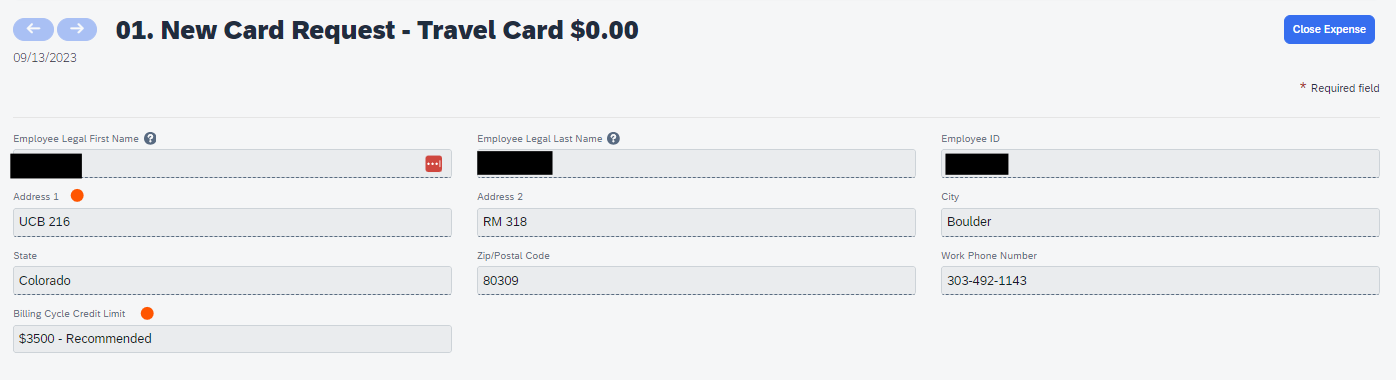
- How do I know what my credit limit is on my travel credit card (t-card)? In general, if no specific limit was requested during your application, then the limit is the recommended $3,500. If you received a t-card through the new Concur request system (on or after September 11, 2023), then you may log into Concur to see your credit limit. It would be detailed in either your application request or update request.
- How do I find the contact information associated with my travel credit card (t-card)? In general, if you did not provide a personal residence during your application, then your address is the CIRES Message Center (UCB 216, RM 318, Boulder, CO 80309). Also, if you did not provide a phone number during your application and one was not listed on Servoy, then your business phone number is 303-492-1143. If you received a t-card through the new Concur request system (on or after September 11, 2023), then you may log into Concur to see your contact information. It would be detailed in either your application request or update request.
-
How do I find my travel credit card (t-card) information in Concur?
- Log into your Concur profile from your my CU Info;
- Select the "Home" drop down menu > "Requests" ;
-
Since your view automatically shows as "Active Requests," change the drop down menu to > "All Requests" ;

-
Your t-card request will be titled either "CIRES Tcard App Lastname" or "CIRES Tcard Upd Lastname". Select the request, then the expected expenses line to see your credit limit and associated contact information.